Switching From Sky Q to Sky Glass or Sky Stream: What Changes
Is Sky Q Being Switched Off?
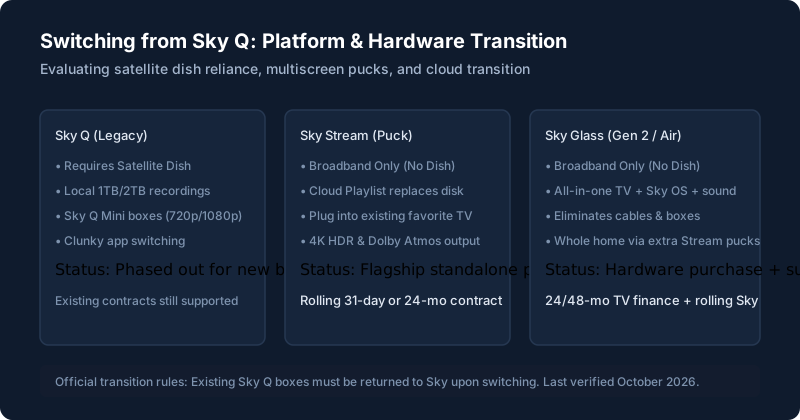
Sky Q is no longer actively marketed to new customers on Sky's UK website; new subscribers are steered exclusively towards Sky Stream and Sky Glass. However, Sky Q is not being switched off for existing customers. Sky has satellite transponder contracts in place for satellite distribution, meaning your Sky Q box will continue functioning as normal for the foreseeable future. You are under no immediate mandatory obligation to leave Q.
What You Gain
- No Satellite Dish: Say goodbye to dish clutter, cabling through exterior brickwork, and loss of satellite signal during heavy snow or thunderstorms.
- Integrated 4K HDR Across All Rooms: Unlike Sky Q Mini boxes (which were locked to 720p or 1080p non-HDR), Sky Stream pucks output full 4K Ultra HD and Dolby Atmos in every extra room.
- Unified Streaming Interface: The Sky OS home ribbon integrates BBC iPlayer, ITVX, Channel 4, Netflix, Prime, and Disney+ into a single search row.
What You Lose or Change (Recording, Dish, Extra Rooms)
The single biggest adjustment for Sky Q veterans is the shift in recording philosophy:
On Sky Q, when you hit record, the raw satellite broadcast is written to an internal 1TB or 2TB hard disk. You can keep it for years, fast forward commercials freely, and watch when your internet is offline. Sky Glass and Stream have no hard drive. Hitting the '+' button bookmarks the show to the cloud. When you press play, it streams from broadcaster catch-up players, meaning expiration dates apply and ad-skipping requires an add-on pack. Read our full breakdown of how recording works on Sky Glass.
Glass or Stream for Q Owners
If you love your existing high-end OLED television (like an LG or Sony), do not buy Sky Glass. Choose Sky Stream instead: it plugs straight into your TV's HDMI port and gives you the exact same platform for £0 upfront hardware cost. If your TV is 10 years old and you want a clutter-free all-in-one upgrade, choose Sky Glass. Read our detailed head-to-head in Sky Glass vs Sky Stream.
Your Existing Contract and Equipment
When you place an order for Glass or Stream, your Sky Q subscription is cancelled on the day the new hardware activates. Under Sky terms and conditions:
- All Sky Q equipment (main box, Sky Q Mini boxes, power leads, and remotes) remains the property of Sky and must be returned via prepaid Royal Mail return packaging within 30 days to avoid non-return penalty charges.
- The satellite dish on your chimney or exterior wall belongs to you; Sky will not remove it, but you may leave it in place or arrange private removal.
Extra Rooms: Q Minis vs Pucks
On Sky Q, multi-room relied on "Sky Q Mini" boxes that established a private Wi-Fi mesh back to the main box. On Glass/Stream, you add Sky Stream pucks via the Whole Home pack. Each puck connects independently to your home router, offering significantly higher stability in larger homes.
Broadband Requirements
Sky Q only required broadband for on-demand downloads; live channels arrived via satellite. On Glass and Stream, every second of live TV consumes broadband bandwidth. You need at least 25Mbps for one screen, and 50Mbps+ if multiple family members stream 4K in different rooms simultaneously. If your broadband line drops, read our Wi-Fi and buffering fixes.
How the Switch Works Step by Step
- Order Sky Stream or Sky Glass online or via customer service.
- Hardware arrives by DPD or courier (usually within 24 to 48 hours).
- Plug in the new unit, connect to Wi-Fi, and complete on-screen account activation.
- Your Sky Q boxes will stop receiving subscription channels upon activation.
- Pack the old Sky Q hardware into Sky’s prepaid returns box and drop off at the Post Office.
Who Should Stay on Sky Q for Now
You should stay on Sky Q if you live in a rural area with broadband speeds below 20Mbps, if you frequently record obscure late-night programmes that never appear on catch-up players, or if you refuse to pay an ad-skipping fee to fast-forward through commercial breaks.
Questions Q Owners Ask
Will I lose my existing recordings?
Yes. Hard-drive recordings saved on Sky Q cannot be transferred to Sky Glass or Stream. Finish your unwatched box sets before activating the new service.
What about prices?
Check our full breakdown of current Sky Glass prices and deals and our standalone Sky Stream guide.
Still stuck after trying these steps?
Unsure whether to buy the TV or the small puck? Read Sky Glass vs Sky Stream for direct pricing and hardware comparisons.