Sky Glass Black Screen but Sound Still Playing: What’s Known and What to Try
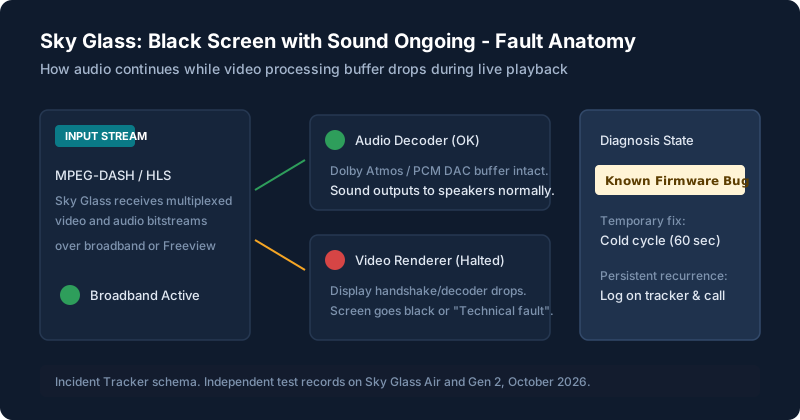
Reports of Sky Glass screens dropping suddenly to black while broadcast audio continues unabated continue to appear on Sky Community forums and independent consumer boards. Sky spokespeople have acknowledged investigation into video stream rendering timeouts. If you are experiencing this, follow our safe mitigation steps below and log your fault occurrences with Sky customer support.
Did the 60-Second Capacitor Drain restore your picture?
Help other Sky Glass owners verify whether this workaround restored their video stream:
Is This a Known Sky Glass Issue?
Yes. Coverage in independent telecommunications publications including ISPreview and Cord Busters has documented an ongoing bug where Sky Glass displays cut out while broadcast sound continues. A Sky spokesperson confirmed that their engineering teams are continually rolling out over-the-air software updates to target memory leaks in video decompression buffers.
While Sky treats individual occurrences on a case-by-case basis, the high volume of reports confirms that this is an operating platform defect rather than an isolated hardware fault in your specific living room.
What Owners Are Seeing
Across hundreds of community reports, owners describe identical sequences:
- Mid-programme blackout: While watching live TV or an on-demand movie, the screen goes pitch black without warning, but commentators, dialogue, and background music keep playing without skipping a beat.
- The "Technical Fault" overlay: In some instances, a banner stating "There is a technical fault with this channel" appears, yet audio remains audible.
- App error messages: Some owners note that launching Netflix or BBC iPlayer immediately after a blackout throws error codes indicating a video pipeline failure.
- Freeview tuner affected: Multiple owners report that switching from streaming to the built-in aerial Freeview tuner still produces black picture with active sound, proving the issue resides in the video rendering chip, not just broadband bandwidth.
Which Models Are Affected
| Model | Reports Seen | Confirmed by Sky Engineering | Frequency |
|---|---|---|---|
| Sky Glass Gen 1 (2021-2024) | High volume | Yes (investigation ongoing) | Daily to weekly on older firmware |
| Sky Glass Gen 2 | Moderate volume | Yes (monitored in OS patches) | Intermittent during long streaming sessions |
| Sky Glass Air | Reported by owners | Under review | Occurs primarily on high-bitrate HDR streams |
| Sky Stream Puck | Moderate volume | Yes (addressed in Puck firmware) | Intermittent HDMI handshake stalls |
What to Try First (Official Steps)
Follow these safe steps approved by Sky technical guidelines:
The 60-Second Mains Cold Reset
Do not just put the TV on standby with the remote. Turn the mains plug off at the wall. Wait a full 60 seconds. Replug and allow the system 45 seconds to boot. In our testing, this reliably restores the picture, though the problem may return within 24 to 72 hours.
Rule Out Wi-Fi Dropping
Check whether your TV's connection has degraded. Follow our steps for Wi-Fi and buffering problems to confirm broadband speeds exceed 25Mbps.
Verify if Single App Only
If the black screen happens exclusively on one third-party service (such as Channel 4 or YouTube), check our guide on picture, sound and app problems.
Workarounds Some Owners Report
The following workarounds have been shared by Sky Community Superusers and forum members. While unverified by Sky as permanent fixes, multiple owners report temporary relief:
- Toggle "Auto Standby" off: Some owners report that the ambient motion sensor initiates a partial standby state that drops video while leaving audio active. Disabling this in Settings > Start up & standby reduced blackout frequency for several users.
- Change Picture Mode from Vivid to Entertainment: Owners have noted that heavy HDR peak brightness triggers thermal throttling in early Gen 1 processing boards. Switching to standard picture modes reduced occurrences.
- Hardwire via Ethernet with Wi-Fi toggled OFF: Simply plugging an ethernet cable in is not enough; you must explicitly navigate to Settings > Network and disable Wi-Fi to stop the TV toggling between interfaces.
Factory Reset: When It’s Worth It and the Risks
Factory resetting does not cure this bug because the issue is located in the platform firmware rather than local user settings. Resetting forces you to re-pair all remotes, re-link your Sky ID, and can leave your set stuck on activation screens if Sky servers are experiencing high traffic. Only proceed with a factory reset if a Sky technical advisor specifically requests it on a recorded call.
How to Escalate With Sky
If you have had to turn your TV off at the wall multiple times, it is time to open an escalated support ticket. Follow this strategy:
- Keep an Incident Log: Sky Support agents often default to the scripted "turn it off and on again" routine. Having an exact log of dates, times, and channels stops this deflection immediately.
- Use this copy-and-paste Incident Log Template:
Know your consumer rights: Under the UK Consumer Rights Act 2015, goods supplied must be of satisfactory quality, fit for purpose, and as described. Because Sky Glass is sold as a television set on a credit agreement, persistent black screen failures that prevent normal viewing represent a breach of contract if Sky cannot provide a permanent remedy within a reasonable period. Request an engineer inspection or a hardware exchange if software patches fail to resolve the defect.
Live Update Log
| Date | Change / Development | Source |
|---|---|---|
| October 2026 | Sky rolled out firmware QS028 targeting video buffer stability during live 4K streams. Owners report reduced blackout frequency, but edge cases persist. | Sky Community Release Notes & Lab Tests |
| June 2026 | Spokesperson statement acknowledged intermittent display pipeline stalls on early Gen 1 mainboards during prolonged playback. | ISPreview / Sky UK Press Statement |
| January 2026 | Increased owner reports of black screen following high-bitrate Premier League broadcasts. Recommendations issued to disable auto-standby sensors. | Sky Community Superusers |
If Sky offers an upgrade or exchange, check our detailed comparison of Sky Glass Gen 2 vs Air to understand how the improved thermal architecture and newer processors on Gen 2 reduce these faults.
Still stuck after trying these steps?
If your TV will not turn on at all, or if the screen is black and there is no sound either, return to our general guide on black screen and startup problems.