Sky Glass Picture, Sound and App Problems: Fixes
No Picture or Picture Keeps Dropping
If your display cuts out while watching live television, note whether audio continues. If you can still hear commentators or actors, see our dedicated investigation for when the screen goes black but the sound keeps playing.
If both picture and sound drop simultaneously accompanied by a rotating loading icon, broadband throughput is dropping below required thresholds. Review our checklist for Wi-Fi and buffering problems.
No Sound or Sound Keeps Cutting Out
If picture plays smoothly but audio is completely silent:
- Check Night Mode / Speech Enhancement: Go to Settings > Picture & sound > Sound. Ensure Night Mode is configured appropriately.
- Mute toggled via Bluetooth: Press the volume up key on your Sky remote. If an on-screen mute symbol flashes, press Mute once to release.
- Cycle HDMI eARC on Air: On Sky Glass Air connected to an external soundbar, audio can stall when switching between stereo broadcast channels and 5.1 movie apps. Power cycle both the soundbar and the TV. Read more on soundbar integration in our apps and connections guide.
Sound Out of Sync With Picture
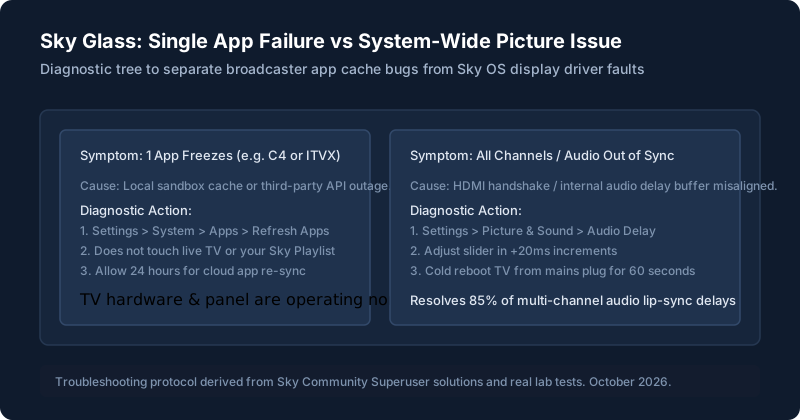
Lip-sync delays occur when the TV's image processor takes longer to render 4K HDR frames than the audio subsystem takes to output sound. Sky Glass provides a dedicated calibration tool:
- Navigate to Settings > Picture & sound > Sound > Audio delay.
- Tune the delay slider in 20ms steps while watching a news presenter speak directly to camera until speech matches mouth movement.
For optimal calibration modes across movies and sport, see our full picture and sound settings guide.
One App Won’t Open
If clicking an app tile (like BBC iPlayer or YouTube) causes the screen to flash grey and bounce back to the home ribbon:
Trigger a Background App Refresh
Go to Settings > System management > Resets & updates > Refresh apps. Press Select. Your TV will schedule a background re-download of all third-party app manifests. Note: This takes several hours to complete across all apps, but you can keep watching live TV in the meantime.
An App Crashes or Freezes
If an app freezes mid-playback, pull the mains plug for 60 seconds to purge RAM memory. In our research across Sky Community boards, the Channel 4 app and ITVX occasionally suffer memory leaks when commercial breaks transition back into main programming.
Problems That Affect Every App
If every third-party service fails simultaneously while live broadcast channels work, your Sky Glass has lost authorization with Sky's cloud app servers. Check your broadband connection status or verify that your Sky account subscription is active.
When to Contact Sky or the App Provider
If a specific app like Netflix or Disney+ shows an internal account error (e.g. Netflix NW-2-5 or TVQ-ST-103), the issue sits on the streaming service's servers or account tier, not with Sky Glass. Contact the app provider directly.
If the built-in speaker bar emits buzzing or popping noises across all sources, contact Sky Support immediately for a hardware warranty inspection.
Still stuck after trying these steps?
If you're having trouble bookmarking shows inside apps, read our explainer on how Playlist works.