Sky Glass Soundbar & eARC Setup: Fixing Dolby Atmos & Audio Delay
Why Sky Glass Experiences Soundbar Audio Lag
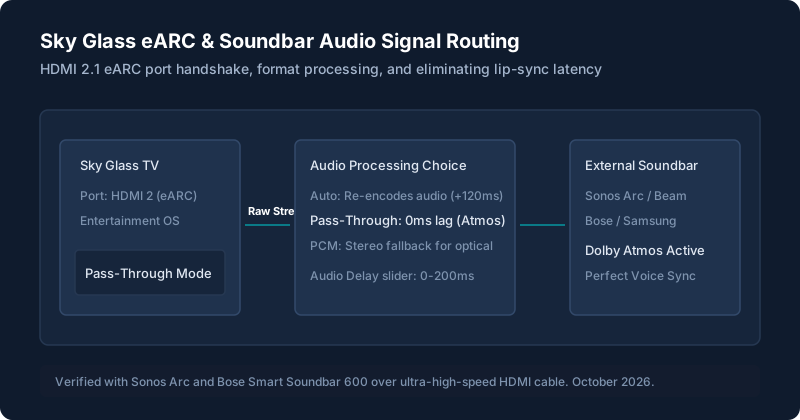
Because Sky Glass contains its own high-powered 6-speaker Dolby Atmos soundbar with upward-firing height drivers, Entertainment OS processes broadcast audio through internal digital signal processing (DSP) filters. When you connect an external soundbar or AV receiver while leaving audio on Auto, the TV attempts to re-encode the stream before sending it down the HDMI cable.
This double-encoding causes actors' lips to move 80ms to 150ms before speech is heard through your external speakers. Because video cannot be delayed backwards in real time without buffering video frames, you must eliminate the source delay by activating raw pass-through.
Locating HDMI Port 2 (The Only eARC Socket)
Sky Glass is equipped with three HDMI 2.1 ports on the rear connector bay, but only HDMI Port 2 supports eARC (enhanced Audio Return Channel).
- HDMI 1: Standard HDMI 2.1 (No audio return channel). Connecting a soundbar here results in total silence.
- HDMI 2 (eARC): Full 48Gbps bandwidth capable of carrying uncompressed Dolby TrueHD and Dolby Atmos bitstreams.
- HDMI 3: Standard HDMI 2.1 (Input only).
Audio Output Modes: Auto vs Pass-Through vs PCM
Navigate to Settings > Picture & Sound > Sound > Audio output. You will find three selectable formats:
| Mode | How It Works | Latency | When to Use |
|---|---|---|---|
| Pass-Through | Sends uncompressed raw digital bitstream directly to soundbar. Soundbar handles 100% of decoding. | 0ms (Lowest) | Recommended for all modern Dolby Atmos soundbars (Sonos, Bose, Samsung, Sony). |
| Auto (Default) | Sky Glass inspects EDID handshake and re-encodes formats internally. | +80ms to +120ms | Only use if using TV's built-in soundbar or basic TV speakers. |
| PCM Stereo | Downmixes multi-channel audio into 2.0 uncompressed stereo. | Low (10ms) | Use only if older optical DACs or stereo amplifiers produce clicking or popping noises. |
How to Calibrate the Audio Delay Slider
If you notice residual speech mis-alignment on live news broadcasts or Sky Sports commentary:
- Tune to a live news broadcast with a close-up studio presenter (e.g. Sky News or BBC News HD).
- Go to Settings > Picture & Sound > Sound > Audio delay.
- Adjust the slider in 10ms increments. For Sonos systems, an offset of +20ms to +40ms typically provides frame-accurate synchronization.
- Press Home to save the adjustment permanently.
Specific Soundbar Setup (Sonos Arc, Bose, Samsung)
Here are tested configuration notes for leading UK soundbar systems:
- Sonos Arc / Beam Gen 2: In the Sonos S2 App, go to Settings > System > TV Dialog Sync. Keep it at 0. Ensure eARC is toggled to ON in Sky Glass menus. The Sonos app will display "Dolby Atmos" when playing compatible Sky Cinema or Sports UHD content.
- Bose Smart Soundbar 600 / 900: In the Bose Music app, set Advanced HDMI CEC to "Alternative" if the soundbar fails to wake automatically when Sky Glass turns on.
- Samsung Q-Series (Q800 / Q990): Note that Samsung Q-Symphony (combining TV speakers with soundbar) is proprietary to Samsung TVs and is not compatible with Sky Glass. Sky Glass internal speakers must remain muted.
Optical Audio vs HDMI eARC (Trade-Offs)
While Sky Glass does include an optical TOSLink port, optical connections are limited by bandwidth to legacy Dolby Digital 5.1. Optical cables cannot transmit Dolby Atmos or high-bitrate surround sound. Always choose an ultra-high-speed HDMI cable connected to HDMI Port 2 over optical.
Fixing No Sound After Sky Glass Wakes from Standby
If your soundbar produces no audio when switching the TV on from standby, the HDMI CEC handshake has timed out. To fix this permanently:
- Go to Settings > Connected Devices > HDMI Control (CEC) and toggle it OFF, wait 5 seconds, then toggle it ON.
- Disable Enhanced Standby in Settings > Start up & standby, so the HDMI bus does not cut power completely to the handshake pins overnight.
Still stuck after trying these steps?
Having overall audio crackles or app-specific freezes? Review our guide on Sky Glass Picture, Sound & App Problems or check the Remote Control Shortcuts to adjust sound presets quickly.