Can You Use Sky Glass Without a Sky Subscription?
What Happens When You Cancel
Many prospective buyers worry that Sky Glass becomes a "brick" or completely disabled if they stop paying Sky. This is incorrect. Consumer rights in the UK require that hardware purchased under a credit agreement remains functional for the consumer.
When your Sky subscription ends, the Sky OS home screen transforms into a simplified interface. Sky broadcast channels are de-authorized, but external inputs and third-party apps remain accessible.
What Still Works (With vs Without Sky Table)
| Feature / Capability | With Sky Subscription | Without Sky Subscription |
|---|---|---|
| Three HDMI Ports (Consoles, Soundbars) | Active (Full 4K 60Hz + eARC) | Active (Full 4K 60Hz + eARC) |
| Built-in 250W Atmos Soundbar (Gen 2) | Active | Active (Decodes HDMI audio cleanly) |
| Terrestrial Aerial Tuner (Freeview) | Backup only | Primary live TV source via aerial socket |
| Third-Party Apps (Netflix, Prime, YouTube) | Integrated in EPG | Accessible via standalone app menu |
| Sky Broadcast Channels (Atlantic, Sports, Cinema) | Active | Disabled |
| Cloud Playlist & '+' Button | Active across all channels | Disabled |
| Unified TV Guide & Voice Search | Full deep search | Restricted to basic Freeview guide |
What Stops Working
Without an active subscription, you lose the signature software features of Sky Glass: the cloud Playlist, unified search across providers, and direct streaming of live Freeview channels over Wi-Fi without an aerial. Consumer watchdog Which? has noted that the interface feels considerably more restrictive without a Sky package, resembling a simplified monitor.
Watching Through the Aerial
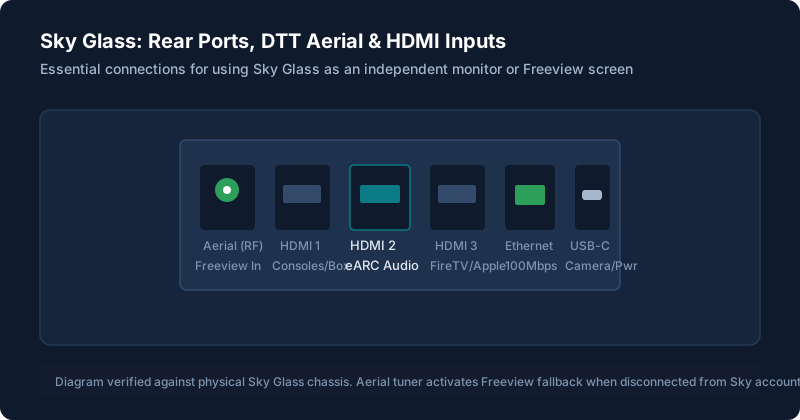
To watch live terrestrial channels without Sky, connect a standard coaxial TV aerial to the rear Aerial In port. The TV will run an automatic Freeview channel scan. Note: this provides live viewing only; you cannot pause or record Freeview without an external box.
Using Other Boxes and Devices Through HDMI
Because all three HDMI ports remain completely unlocked, you can plug in an Apple TV 4K, Amazon Fire TV Stick 4K, Roku Streaming Stick, or Freeview recorder. The TV acts as a high-quality 4K display and leverages the Gen 2 soundbar for outstanding external audio. For port setups, see using external devices through HDMI.
Contracts and Cancelling Early
Be aware of how your contracts are structured:
- TV Hardware Finance: This is a fixed 24-month or 48-month loan via Sky Credit. You cannot cancel this loan early without paying the remaining balance in full. You must continue making your monthly hardware payments until the television is paid off.
- Sky TV Content Subscription: If you chose a 31-day rolling contract, you can cancel at any time with 31 days' notice. If you signed a 24-month content contract, early termination charges will apply if you cancel before your contract end date.
To check exact monthly costs before committing, review our breakdown of Sky Glass prices and subscription costs.
Is Sky Glass Worth It If You Might Cancel Later?
If you plan to subscribe to Sky for only a few months before cancelling, buying Sky Glass is not recommended. Standard smart televisions from LG, Samsung, or Sony offer richer standalone app stores and better offline interfaces. However, if you already own Sky Glass and need to trim your monthly bills, keeping the TV and adding a £35 Fire TV Stick is an excellent, practical solution.
Common Questions
Do I have to return the TV if I cancel?
No. Unlike Sky Q boxes or Sky Stream pucks, the Sky Glass TV is purchased by you and remains your property.
Would Sky Stream be better if I might cancel?
Yes. On Sky Stream, there is zero hardware loan to pay off. See Sky Glass vs Sky Stream.
Still stuck after trying these steps?
Want to understand recording limitations before deciding? Read our guide on how Playlist and recording work.