Can You Record on Sky Glass? How Playlist Works
Where Are My Recordings? Playlist Explained
If you have recently moved from Sky Q or a Humax/Freeview PVR, searching for a "Recordings" folder will leave you puzzled. On Sky Glass, your saved content lives in the Playlist rail on the home screen.
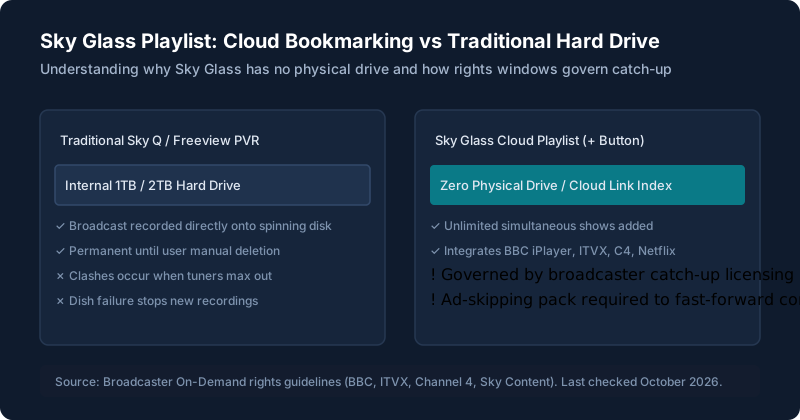
Rather than storing gigabytes of video on an internal drive inside the TV cabinet, Sky Glass acts as a universal bookmark index across all UK broadcasters and streaming apps.
How to Add a Programme to Playlist
From the Remote Using the '+' Key
While watching any live show or browsing the electronic programme guide (EPG), highlight the title and press the physical '+' button located directly above the home button on your remote. A tick will appear confirming it has been added.
Using Voice Control
Press the microphone button (or say "Hello Sky" on Gen 2) and say: "Add Strictly Come Dancing to Playlist" or "Add House of the Dragon". The entire current series is automatically added.
What You Can and Can’t Add (Searchable Channel Matrix)
Type a channel name into the search box below to instantly verify whether shows can be bookmarked to your Playlist, which catch-up player streams them, and how long rights last:
| Channel / Service | Can You Add Live? | Streams Via Playlist? | Important Rights & Expiration Notes |
|---|---|---|---|
| Sky Atlantic | Yes (Immediate) | Yes (Sky Cloud CDN) | Stored in Sky cloud; retains 4K HDR quality; available indefinitely for active subscribers. |
| Sky Sports Main Event / Premier League | Yes | Yes (Sky Sports On-Demand) | Live matches added to Playlist; catch-up replays expire after 7 to 30 days. |
| BBC One, Two, Three, Four | Yes | Yes (BBC iPlayer) | Reroutes through BBC iPlayer; remains available per BBC rights (typically 30-365 days). Ad-free. |
| ITV1, ITV2, ITVBe, ITV4 | Yes | Yes (ITVX) | Reroutes via ITVX; requires Ad-Skipping pack (+£5/mo) to fast-forward commercials. |
| Channel 4, More4, Film4 | Yes | Yes (Channel 4 app) | Reroutes via C4 player; select imported US movies have shorter 30-day broadcast licensing windows. |
| Channel 5, 5USA, 5Action | Yes | Yes (My5 player) | Catch-up streaming via My5; standard commercial breaks apply unless ad-skipping active. |
| TNT Sports 1, 2, 3, Ultimate | Yes (Subscription required) | Yes (Discovery+ App) | Streams live events and on-demand highlights through the integrated Discovery+ player. |
| Netflix, Disney+, Prime Video | Yes | Yes (Direct App Deep-Link) | Pressing '+' adds the series to your profile queue inside that streaming service. |
| Freeview Aerial Channels (Offline) | No | No | Channels watched via the terrestrial aerial tuner cannot be added to Playlist when offline. |
Watch From the Start and Catch-Up
If you tune into a programme 20 minutes late, Sky Glass displays a prompt: "Watch from start". Pressing Select instantly rewinds the cloud stream back to the opening scene without having to pre-record the channel.
Are There Limits? (Storage, Clashes, Duration)
- No Storage Limits: Because nothing is saved on a physical disk, you can bookmark hundreds of series simultaneously without running out of hard drive space.
- Zero Recording Clashes: You can bookmark 5 programmes airing at the exact same time on different channels; none will fail.
- Time Limits: Content remains in your Playlist as long as the broadcaster holds on-demand streaming rights. Live sporting events are typically available on catch-up for 7 days, BBC shows for 30 to 365 days, and Sky original series indefinitely.
Using the Aerial and Freeview Tuner as a Backup
Sky Glass includes a built-in DVB-T/T2 aerial tuner on the rear. If your home broadband fails, the TV switches to Freeview mode so you can watch live terrestrial broadcasts through a conventional aerial. However, Freeview channels cannot be paused, rewound, or saved to Playlist when internet is disconnected. Read more about offline capability in our guide to using Sky Glass without a subscription.
Recording Freeview With a Separate Recorder
If you require traditional physical recording for Freeview channels, you can connect an external PVR box (like a Manhattan T3-R or Humax Aura) to one of Sky Glass’s three HDMI ports. You can then record to that box's internal disk independently. Read more in apps and connections.
Sky Glass vs Sky Q: How Recording Differs
For existing satellite customers, this is the most critical operational change. Read our complete comparison on moving from Sky Q to Sky Glass.
Playlist Problems (Missing or Delayed Items)
Occasionally, an item you added to your Playlist may show as "Unavailable" immediately after a live broadcast ends. This happens because the broadcaster (e.g., ITV or Channel 4) must transcode and publish the catch-up file to their cloud servers, which can take 15 to 60 minutes after the live broadcast finishes. For broader app issues, see picture, sound and app problems.
Still stuck after trying these steps?
Want a complete overview of the television's hardware? Read what Sky Glass is and how it works.