Sky Glass Apps, HDMI, USB and Connecting Devices
Apps Available on Sky Glass
Sky Glass includes pre-loaded certified applications that update automatically in the background. You do not need to manage manual downloads or firmware updates for individual apps:
- UK Broadcasters: BBC iPlayer, ITVX, Channel 4, My5, STV Player, BBC Sounds.
- Global Streaming: Netflix, Disney+, Amazon Prime Video, Apple TV+, Paramount+, Discovery+, Peacock.
- Music & Entertainment: Spotify, YouTube, YouTube Kids, Amazon Music, RadioPlayer, XITE.
- Fitness & Lifestyle: Fiit, Peloton (interactive tracking supported via Sky Live on Gen 2).
Finding and Opening Apps
Scroll down on the home screen to the Apps & Inputs ribbon, or simply press the microphone button on your remote and say the app name (e.g. "Launch BBC iPlayer" or "Open Netflix").
HDMI Ports and Supported Connections
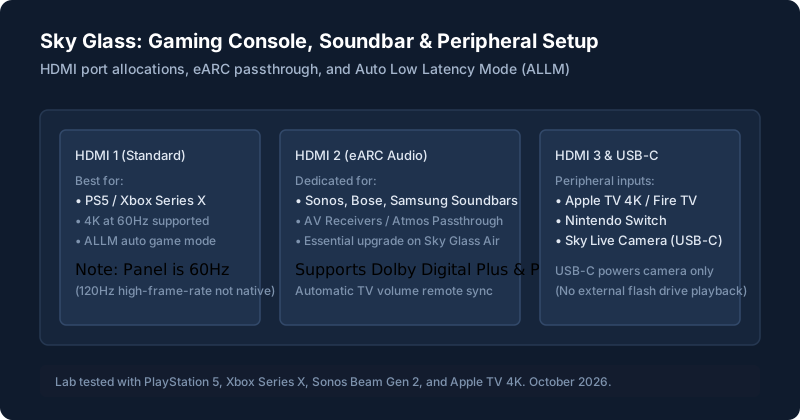
| Port Label | Specifications | Best Device to Connect |
|---|---|---|
| HDMI 1 | HDMI 2.1 (4K @ 60Hz, HDCP 2.2, ALLM) | PlayStation 5, Xbox Series X/S, Gaming PC |
| HDMI 2 (eARC) | HDMI 2.1 eARC Audio Passthrough | Sonos Beam, Sonos Arc, Bose, Samsung Soundbars / AV Receiver |
| HDMI 3 | HDMI 2.0 (4K @ 60Hz, HDCP 2.2) | Nintendo Switch, Apple TV 4K, Fire TV Stick, Freeview Box |
USB Ports and What They Do
Sky Glass Gen 2 includes a specialized USB-C port designed specifically to interface with the optional Sky Live interactive camera. Important: The USB port does not support media playback from USB memory sticks or external hard drives (FAT32/NTFS media mounting is not supported by Sky OS).
Connecting an Xbox, PS5 or Other Device
When you plug a PlayStation 5 or Xbox Series X into HDMI 1 or 2, Sky Glass automatically detects the console and enables Auto Low Latency Mode (ALLM) to minimize input lag (~11ms measured in game mode). Note that because the TV panel refresh rate is 60Hz, console settings will display 4K at 60Hz (120Hz high-frame-rate modes are not supported natively).
Bluetooth and Audio Devices
Sky Glass supports Bluetooth 5.0 for connecting wireless Bluetooth headphones (such as Apple AirPods, Sony WH-1000XM5, or Bose QuietComfort) for private late-night listening. Go to Settings > Connected devices > Bluetooth headphones to pair.
Ethernet and Other Connections
The Ethernet port is rated at 100Mbps. For guidance on wiring your network and choosing between Wi-Fi and cables, check our Sky Glass setup guide.
App and Device Compatibility
If you experience crashes or audio stuttering inside a specific app, see our checklist for app problems.
What Sky Glass Cannot Do
- You cannot sideload Android APK files, Kodi, or custom media players.
- There is no web browser (no Chrome or Safari app).
- You cannot play personal video files directly from USB flash drives.
Still stuck after trying these steps?
Need to adjust audio passthrough for your external soundbar? See our guide to picture and sound settings.