Sky Glass Remote Not Working: Pairing, Voice and Volume Fixes
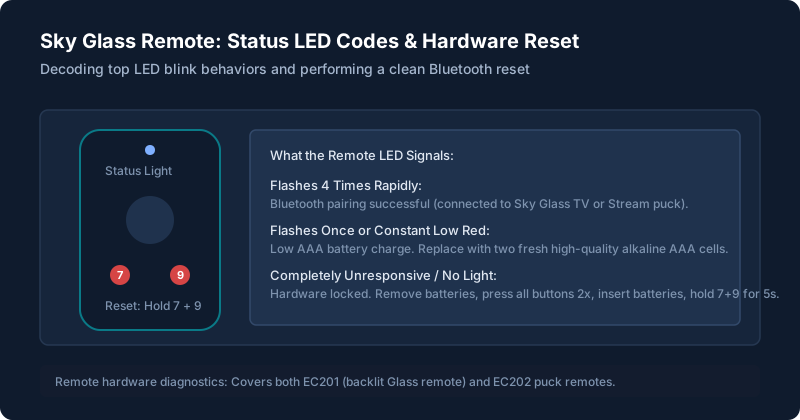
Remote Completely Unresponsive
If pressing buttons produces no response on screen and no LED flash at the top of the remote:
The Mechanical Button Massage & Battery Drain
Slide open the rear battery compartment and remove both AAA batteries. Press every single button on the remote twice firmly (including power, +, home, and volume). This discharges built-up static capacitance and clears stuck microswitches.
Insert Fresh High-Drain Alkaline Batteries
Do not use partially depleted rechargeable batteries. Sky Glass remotes use active Bluetooth RF and backlighting sensors that require stable 1.5V voltage. Insert fresh Duracell or Panasonic alkaline cells.
Buttons Work Only Sometimes
If the remote only works when pointed directly at the bottom right corner of the TV from less than 2 meters away, your remote has dropped its Bluetooth connection and is operating in fallback Infrared (IR) mode.
In Bluetooth mode, you should be able to control the TV from anywhere in the room without pointing. Follow the pairing steps below to restore Bluetooth communication.
Remote Won’t Pair
Hard Reset the Remote (Clears Stored Bluetooth ID)
Press and hold buttons 7 and 9 simultaneously for 5 seconds until the small light above the Sky logo flashes 4 times.
Pair Cleanly to Your Sky Glass
Turn on the TV using the physical standby button on the right side of the cabinet. Stand within 1 metre of the screen. Press and hold buttons 1 and 3 together for 3 seconds. An on-screen prompt will confirm "Your remote is now connected".
Voice Control Isn’t Responding
If pressing the microphone button fails to bring up the search pill:
- Voice control requires an active Bluetooth link. If your remote is in IR fallback mode, the microphone cannot transmit audio data. Re-pair via 1 and 3.
- For hands-free "Hello Sky" voice commands on Gen 1 and Gen 2, ensure the physical microphone privacy switch on the lower TV bezel is not toggled to red/mute.
To learn the full list of voice actions and commands, read our comprehensive how the Sky Glass remote works guide.
Volume Buttons Aren’t Working
If the volume rocker works on internal TV speakers but does not adjust your external soundbar, HDMI CEC handshaking has dropped. Go to Settings > Connected devices > Audio system and re-run the audio setup wizard to allow the remote to send volume control signals via eARC.
Finding or Replacing a Remote
If your remote is permanently dead or damaged, you can request a replacement directly from Sky. If you are within your 24-month hardware warranty, Sky Customer Support typically issues one replacement remote free of charge. Alternatively, official Sky Glass Bluetooth remotes (model EC201) can be purchased from the Sky Accessories store or authorized retailers.
When the Problem May Be the TV
In multiple community reports, owners assumed their remote was dead, only to discover the entire television had frozen in standby.
To verify: press the physical standby button located on the side or rear of your Sky Glass frame. If the TV does not turn on from the physical button either, the TV operating system has halted. Consult our guides for black screen and startup problems and black screen but sound still plays.
Still stuck after trying these steps?
If your remote is working but apps crash or sound is out of sync, check our troubleshooting for picture, sound and app problems.