Sky Glass Buffering, Freezing or Not Connecting to Wi-Fi: Fixes
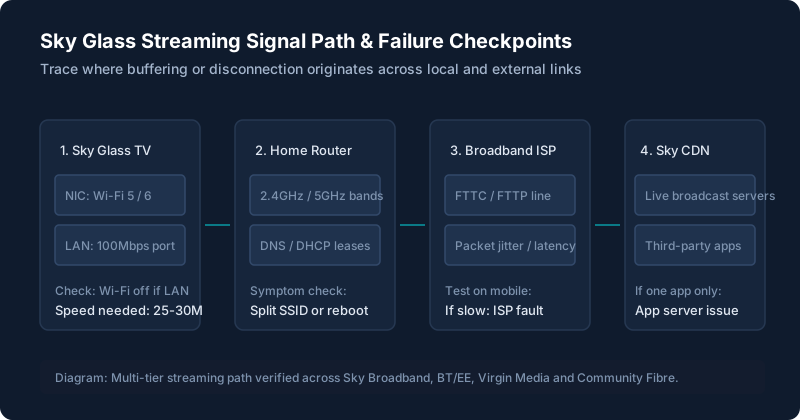
Is the Problem With Sky Glass or Your Broadband?
Because Sky Glass relies 100% on cloud streaming instead of a satellite dish, any micro-drop in local bandwidth causes live television to freeze. Use this quick diagnosis:
- Test speed directly on the TV: Open the Netflix app on your Sky Glass. Navigate to Get Help > Check Network. The Netflix diagnostic tests connection directly from the TV to real UK content delivery servers. If it reports under 25Mbps, the issue is local signal strength.
- Test on another device: Run an independent speed test (like fast.com or speedtest.net) on your mobile phone while standing right in front of the Sky Glass. If your phone gets 150Mbps but the TV buffers, the TV's wireless receiver is suffering interference.
⚡ Broadband Speed & Buffering Risk Estimator
Enter your measured download speed and streaming setup to calculate whether your broadband provides sufficient overhead to prevent buffering wheels:
TV Can’t Connect to Wi-Fi
If your TV claims "No Internet Connection" or refuses to accept your password:
- Split 2.4GHz and 5GHz router bands: Sky Glass functions significantly better on 5GHz. Many modern dual-band routers (BT Smart Hub, Virgin Media Hub 4/5, Sky Broadband Hub) bundle both bands under one SSID. The TV can get stuck bouncing between them. Log into your router settings and give the 5GHz network a distinct name (e.g., Home_5G), then connect Sky Glass to it.
- Forget and re-add network: Navigate to Settings > Network > Reset. Power cycle the TV at the wall, then re-enter the network key.
Wi-Fi Connects but Nothing Will Stream
If the network menu displays three white ticks (Connected to Router, Connected to Internet, Connected to Sky), yet the screen remains frozen on "Please wait" or "Loading":
This indicates an expired DNS cache or DHCP lease. Switch off your broadband router at the wall for 2 full minutes. While the router reboots, pull the power plug on Sky Glass for 60 seconds. Power the TV back on only after the router shows all green lights.
Programmes Keep Buffering or Freezing
If picture stutters or drops resolution every few minutes, disable background downloads on other home devices (consoles, torrent clients, cloud photo backups). Live 4K broadcasts require steady jitter-free throughput, not just high burst download speeds.
Only One App Has Problems
If live Sky channels and Netflix work seamlessly, but ITVX, Channel 4, or Disney+ keeps freezing, the problem is not your Wi-Fi. It is an isolated broadcaster app bug. Review our specific solutions for picture, sound and app problems.
Ethernet vs Wi-Fi: What to Try
Many community forum posters assume plugging in an ethernet cable will magically solve all buffering. However, our testing reveals a critical detail: the ethernet port on Sky Glass is a 100Mbps port, not Gigabit. While 100Mbps is more than sufficient for 4K streams (which require ~30Mbps), a strong 5GHz Wi-Fi signal can actually provide lower packet latency in some homes.
If you connect an ethernet cable to your Sky Glass, you must manually turn off Wi-Fi in Settings > Network. If Wi-Fi remains turned on, the Sky OS network manager frequently attempts to maintain dual connections, leading to periodic 10-second freezes as it renegotiates gateway routes.
For more detailed port locations and connection setup, consult the Sky Glass setup guide.
Check for a Wider Service Problem
Before spending an afternoon resetting your hardware, check whether Sky's central streaming servers or your broadband exchange are down. Visit the official Sky Service Status checker or third-party monitoring sites (such as Downdetector). If thousands of UK users report simultaneous outages, the fault sits in Sky’s cloud infrastructure.
When to Contact Your Broadband Provider and When to Contact Sky
| What you see | Most likely fault area | Who to contact |
|---|---|---|
| All devices in house have no internet | External broadband line or fiber outage | Your broadband ISP (BT, Virgin, Vodafone, Sky Broadband) |
| Phone gets 100Mbps+ near TV, but TV constantly loses signal | Sky Glass Wi-Fi card or local RF interference | Sky Customer Support (TV Hardware team) |
| Live Sky channels buffer, but YouTube & Netflix stream 4K fine | Sky CDN broadcast routing node | Sky Customer Support |
| TV completely freezes on boot and won’t reach home screen | Operating system boot hang | See our black screen and startup problems guide |
| Stuck on network password screen during setup | DHCP handshake or activation lock | See our guide on setup, PIN and software errors |
Still stuck after trying these steps?
If your connection is fast and stable, but picture frequently drops to black with sound still continuing, visit our screen goes black but the sound keeps playing live tracker.